Marketing · An Earng Media product

Your marketing, run on one platform.

Marketing is the platform our team runs client marketing on: Meta ads, video and graphic creative, social posts, SEO articles, your Google Business Profile and landing pages, all working from one brand kit. Today we run it for you.

Run for you by our team One brand kit behind every tool You approve before anything goes out

The Marketing home: a Needs attention list with a disapproved Meta ad, a social post that didn't go out, articles waiting for approval and set-up reminders, above This week's tiles for articles, social posts, Meta spend, landing page leads and AI costs.

The tools

Everything a campaign needs, from the brief to the report.

The same tools our team uses every day, grouped the way the work happens.

01 · Ads

Ads that start from what works

Your Meta ads beside the creative behind them, a library of ads worth learning from, and scripts written from your own offer.

Meta ads

Every Meta ad, running or not

Each ad across your connected Meta accounts shows its creative and copy, whether Meta is running it (and why not when it isn't), and its spend, leads and cost per lead. Preview any ad, save it to the Ad Library or write a new script from it.

The Meta ads gallery for a solar installer's ad account: four ad cards with their pictures, Running, Ad paused and Not running labels, the copy, and spend, leads and cost per lead in Australian dollars.
Ad Library

Ads worth learning from

Keep the ads worth learning from, yours and competitors' from Meta's public Ad Library, tagged by style and framework. Each saved ad is transcribed and broken into a beat-by-beat script you can reuse.

The Ad Library: saved video ads from four brands, each with its framework, headline, style tags and a Write a script button.
Script Writer

Scripts written and edited with AI

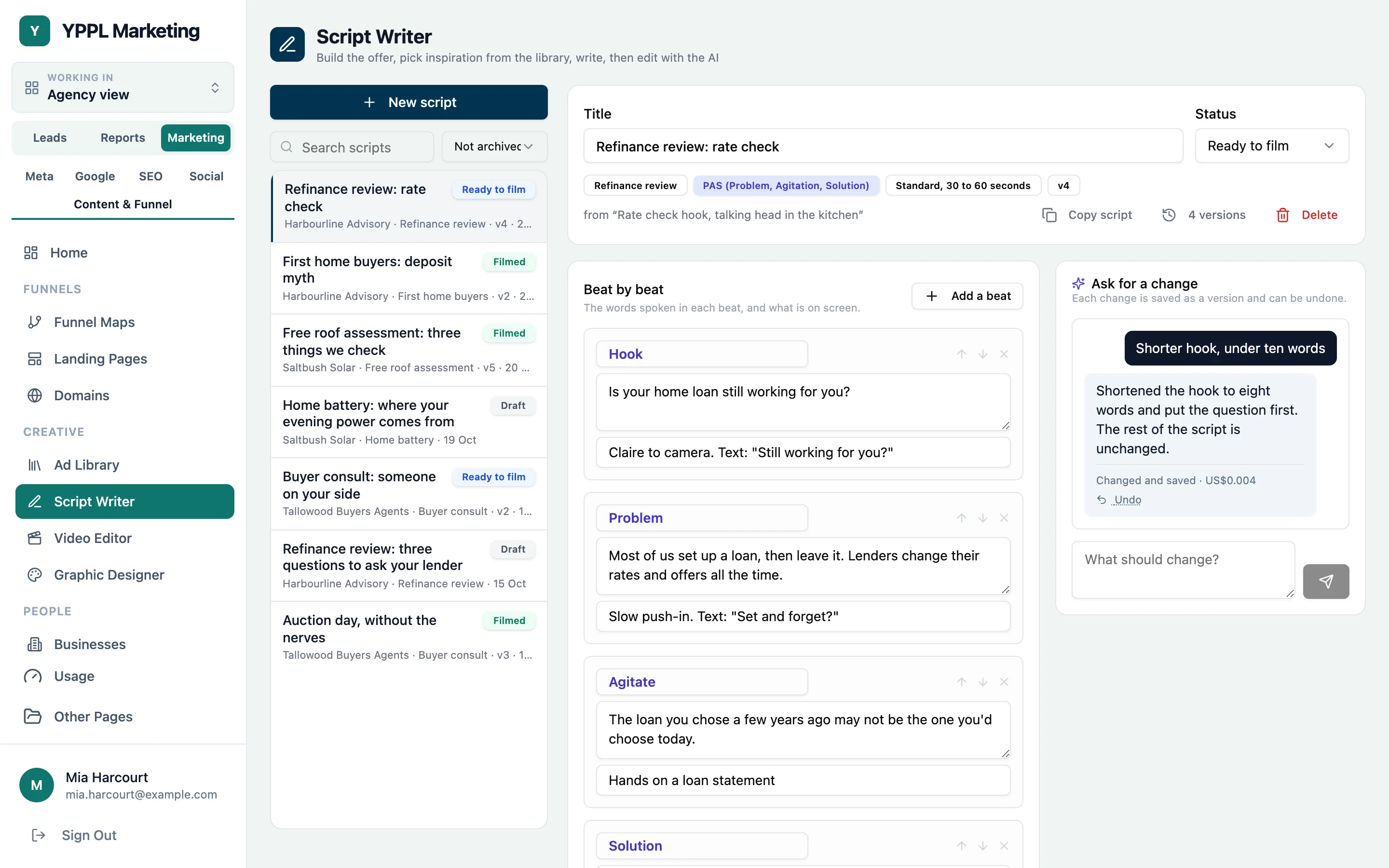
Draft your offer from your own pages, pick up to three saved ads as inspiration, and write scripts you can edit beat by beat or by asking the AI.

  • Every change to a script is kept as a version
The Script Writer: a list of scripts with their status, and one script open with its beats and an AI change request that has been saved as version 4.
02 · Creative

Creative without the production queue

Video and static ads made from your footage, your script and your brand, checked before anything goes out.

Video Editor

Footage in, finished ads out

Upload the footage and the script, add a brief and a reference video, and pick a style from the house editing styles or your own brand kit, with a preview of each. The editor cuts the takes to the script with captions, overlays, music and sound effects, in 9:16 and 4:5.

The Video Editor's Style step: a gallery of editing styles with still previews, the business's brand kit as a client style, and the brief rail beside it.
Review

Notes pinned to the moment

Watch each version, pin notes to the exact moment they apply to, then send them back for the next version or approve it.

The Video Editor's Review step: the video player with notes pinned along its timeline, version chips, the quality checks and the list of open notes with Send changes and Approve.
Quality checks and handover

Checked, then handed over

Every render is checked for loudness, safe zones and broken frames before it can be approved. An approved version comes as one pack: each format's video, caption files, audio stems and the final mix.

  • Music licences tracked, so paid ads only use cleared tracks
An approved video in the Video Editor: the handover pack ready to download, and the render's quality checks listed in plain words, all passed.
Graphic Designer

Static ads you can still edit

Write the copy once and draw it several ways in your brand, then rate each result to see which approach works. Open any graphic to move, retype or recolour each layer, or ask the AI for a change in plain words.

The Graphic Designer's layered editor open on a solar ad: the layers list on the left, the ad on the canvas with one layer selected, and its settings on the right.
03 · Social and SEO

Show up every week, in feeds and in search

A social calendar that runs through to the shoot, articles that carry your brand, and a Google listing that stays active.

Social planner

Plan posts in the real feed

See each account's feed the way the platform shows it, with your planned and scheduled posts above the live ones and an ideas column to drag from. Instagram, Facebook, LinkedIn, YouTube and TikTok.

  • Facebook, Instagram, LinkedIn and YouTube post automatically once connected
The Social planner for Harbourline Advisory: the brand list, an ideas column, the Instagram profile drawn in a phone with planned, scheduled and inspiration posts marked above the real posts, and the posting rhythm and top posts on the right.
Progress

Every post's steps and owners

Track every planned post from script to scheduled: a dot for each step, who has the next one, what's late and what's waiting for approval.

The Social Progress tab: two posts ready for approval, the signed-in person's jobs grouped by day with Upload and Script buttons, and every planned post with a timeline of step dots, the next step's owner and an approval label.
Keyword research

Know what to write next

Each website gets a confirmed focus, its Google searches grouped into themes, the best opportunities flagged and a shortlist of what to write next, from Search Console and keyword data.

The Keywords screen for Harbourline Advisory: its focus, top themes with searches and impressions, flagged opportunities and the Write about shortlist.
Articles

Articles with your brand on every picture

Articles are written to each site's rules and go out with pictures carrying your brand kit's logo and headline, after someone approves them.

A Saltbush Solar article about home batteries, scheduled to publish, with its top picture showing the Saltbush logo and the article headline.
Google Business Profile

Your listing, kept active

Your Google listing and latest reviews sit beside a queue of posts, drafted with AI, approved by a person, then published or scheduled.

The Business Profile tab for Harbourline Advisory: the Google listing with opening hours, recent reviews with replies, and the posts queue with a scheduled and an approved post.
A filming sheet for three videos, showing the first script with its posting day, length, hook, numbered beats with camera notes and on-screen words, B-roll, props, location and a note to check before filming.
Filming sheet

Scripts for a shoot

Every script for a shoot on one page: hook, lines, shots, words on screen, props and location, ready to print or read on a phone.

The Inspiration tab's competitor feed for Harbourline Advisory: a grid of recent posts from four followed accounts, standout posts marked with how far above their usual engagement they did, two posts picked, and buttons to make scripts or pull ideas.
Inspiration

Competitor posts in one feed

Recent posts from every account you follow for inspiration, with standout posts flagged, ready to turn into ideas or scripts.

The October articles calendar for three websites, with published, scheduled and draft articles and empty slots for autopilot to draft.
Article calendar

Articles on a schedule

One calendar for every site's articles: what's gone out, what's scheduled or waiting for approval, and the slots still to fill.

04 · Pages

Landing pages that send leads somewhere

Funnels mapped end to end, with pages hosted on your own domain.

Landing pages and funnels

Pages on your domain, grouped into funnels

See each funnel's pages in order, from the offer page to the thank-you page, with A/B variants, branches and the leads each page brought in. Edit a draft by asking the AI and publish when it's right.

Landing Pages: four funnels for three businesses, each showing small previews of its pages in order, with the leads each page brought in over 30 days.
Funnel map

Every funnel mapped end to end

Lay out what each funnel is made of, from the ads to the landing pages, the follow-up and the sales pipeline, with the offer it sells.

A funnel map for a refinance offer: phases for advertising, landing page and follow-up, with step cards for the Meta ad, offer page, thank-you page, CRM webhook, email and pipeline.
05 · Running it

One place to run it all

What needs doing this week, and one brand kit behind every tool.

Marketing home

One list of what needs doing

What needs fixing or approving across every channel, with a button to where each one is fixed, above this week's figures: articles and social posts published, Meta spend and landing page leads.

The Marketing home: a Needs attention list with a disapproved Meta ad, a social post that didn't go out, articles waiting for approval and set-up reminders, above This week's tiles for articles, social posts, Meta spend, landing page leads and AI costs.
Brand kit

Set your brand once

Logos, colours and fonts are set once in your brand kit, and the article writer, Graphic Designer and Video Editor all draw from it.

A mortgage broker's brand kit open in the editor: main, on-dark, on-light and mark logos, the brand, brand dark, light tint, ink and paper colours with an accent, and the heading and body fonts.

More from the app

The Graphic Designer's results for a solar installer's test: ad graphics grouped by concept, each with its recipe, rating and note.

Static ads, drawn several ways

Write the copy once, draw it several ways in your brand, and rate each result to see which approach works.

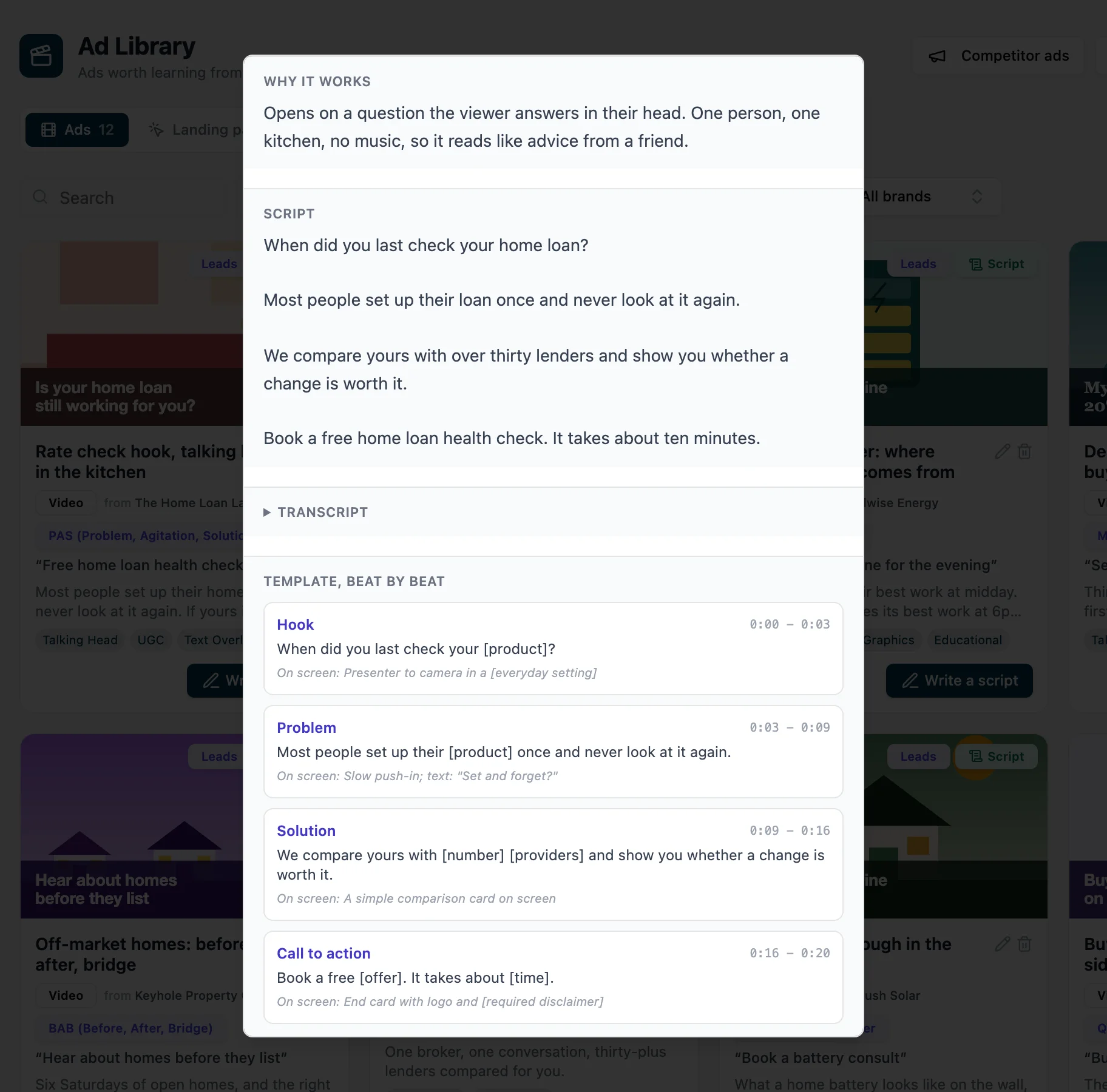
A competitor's saved video ad open over the Ad Library, showing why it works, its script, and a template of four timed beats with placeholders.

Every saved ad broken into beats

Open a saved ad to see why it works and its script turned into a timed, beat-by-beat template you can write your own from.

What a client says about our marketing

Jackson and the team at EarnG Media have been Brilliant.

They really stand out in there ability to get the strategy right before implementation! Then delivering to a really high standard.

It has also been really refreshing to work with an agency that simply makes it happen. Not everything goes right, what i do commend them on is always pulling through and taking a level of ownership on delivering results.

We have worked with them now coming up to 12 months and they have really taken care of us and positioned Resvita perfectly through our digital landscape

From our social media campaigns, CRM implementation, sales training, website, assisting in our live events, webinars and now our Podcast.

It has made it so much simpler to deal with a company that can cover so much scope to a high level

Could not recommend them highly enough!

Thanks team, looking forward to many more years and successful projects together!

Josh WaldromResvita · Google review, March 2026

Who it's for

For businesses that want marketing that keeps moving.

Businesses that want it done for them

Our team runs the tools. You see the work and approve it.

Brands that live on Meta

Ads, creative and scripts side by side, built from what's working.

Teams that film a lot

A shoot day becomes finished, checked ads in every format.

Local businesses found on Google

Articles, Search Console and your Business Profile in one place.

Questions

About Marketing.

Do you run it for us, or do we use it ourselves?

Today our team runs Marketing for our clients, and you see and approve the work. If you'd like your own team using it, ask us about access.

Which platforms does it cover?

Meta for ads. Instagram, Facebook, LinkedIn, YouTube and TikTok for social posts (TikTok posts are uploaded by hand for now). Google Search Console and Business Profile for SEO.

Does AI do everything?

AI drafts and edits; people approve. Scripts, articles, social posts and video versions all go through approval before anything is published.

Do I need to buy leads from you to use it?

No. Marketing stands on its own. It works alongside Reporting and Your Pay Per Lead if you use them.

What does it cost?

Plans are being finalised. Book a demo and we'll talk through what you need.

See the tools on your brand.

Book a demo and we'll show you Marketing working on real campaigns, and how we'd run it for you. Want your own team on it? Ask us about access.