Reporting · An Earng Media product

See what every lead turned into.

Reporting puts your ad spend and your CRM's outcomes in one live report: leads, qualified rate, cost per lead, and the cost of every stage your CRM records, from booking to sale. Weekly, monthly and by campaign.

Meta spend, read-only Outcomes from your CRM Logins for your team

The Results page for Saltbush Solar: cards for leads, qualified share, spend, cost per lead, cost per site visit and cost per sale, above a colour-coded weekly table.

Three sources, one report

Spend in one place, outcomes in another. Not any more.

  1. 01

    Spend

    Connect your Meta ad account with read-only access: it can't change, pause or create ads. Other spend can be imported.

  2. 02

    Leads

    From Your Pay Per Lead, your landing pages or any other source you send in, with every qualifying answer.

  3. 03

    Outcomes

    Your CRM sends stage changes back through Zapier, n8n or a file import, and we map them onto clear report stages.

Inside the report

From the first lead to the last sale.

The weekly report

Spend, leads and sales, week by week

Leads, qualified rate, spend, cost per lead and the sales they turned into, week by week or month by month, for every source together or one at a time. Each figure is compared with the period before.

  • Cost per lead, and the cost of up to two CRM stages you choose
  • Questions and answers: how your leads answered the form
The Results page for Saltbush Solar: cards for leads, qualified share, spend, cost per lead, cost per site visit and cost per sale, above a colour-coded weekly table.
Outcomes from your CRM

What each week's leads were worth

Bookings, visits and sales come back from your own CRM through a live feed (Zapier or n8n) or a file import, so each week shows what its leads cost and what they turned into.

  • Count results in the week the lead arrived, or the week they happened
A weekly table for Saltbush Solar with blocks for leads and spend, qualified leads, site visits, sales and expected revenue, each week compared with the one before.
Your CRM's stages

Your CRM's stages, in plain language

Every stage your CRM sends back is listed with how often it happened. We rename them, choose which go on the report, and count each one as a booking, a sale or something else.

The CRM stages tab for Saltbush Solar: stages such as Contacted, Site visit booked, Quote sent and Sold, each with its number of events, its name on the report, an on-or-off switch and what it counts as.
Campaign breakdown

The strong campaigns and the weak ones

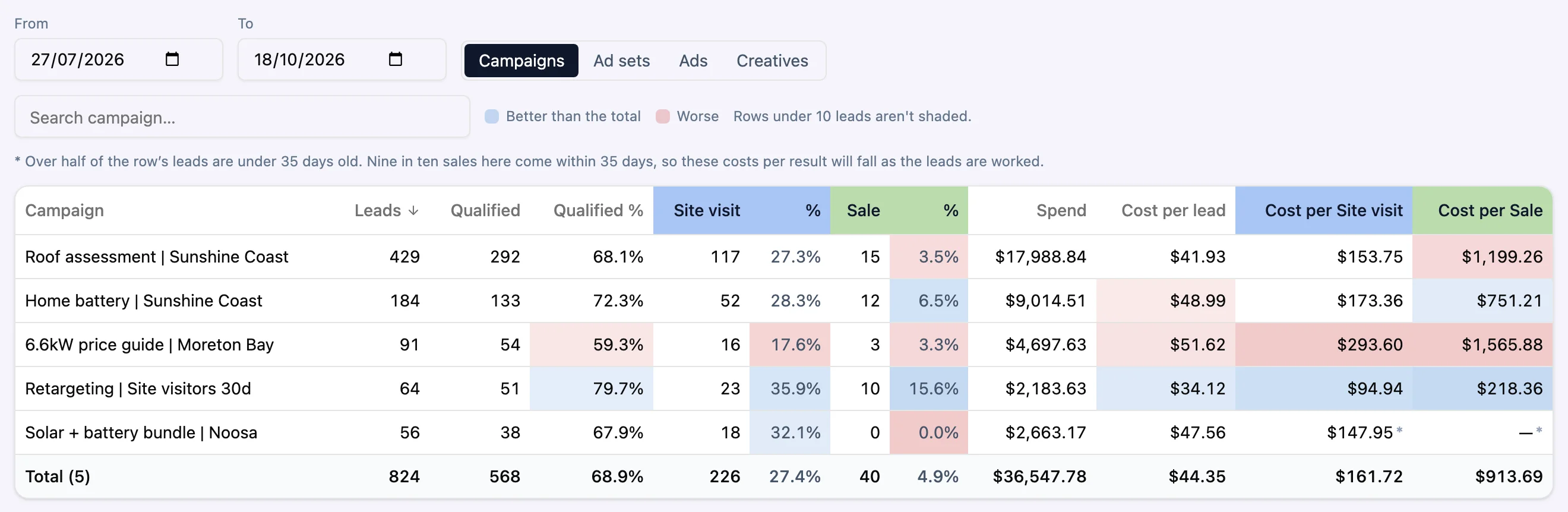
Each campaign's leads, qualified share, outcomes and costs side by side, shaded against the total so the strong and weak ones stand out. Go down to ad sets, ads and creatives.

The Campaigns and ads tab for Saltbush Solar at campaign level: five campaigns with leads, qualified leads, site visits, sales, spend and cost per lead, site visit and sale.
Creatives

Every creative, with its results

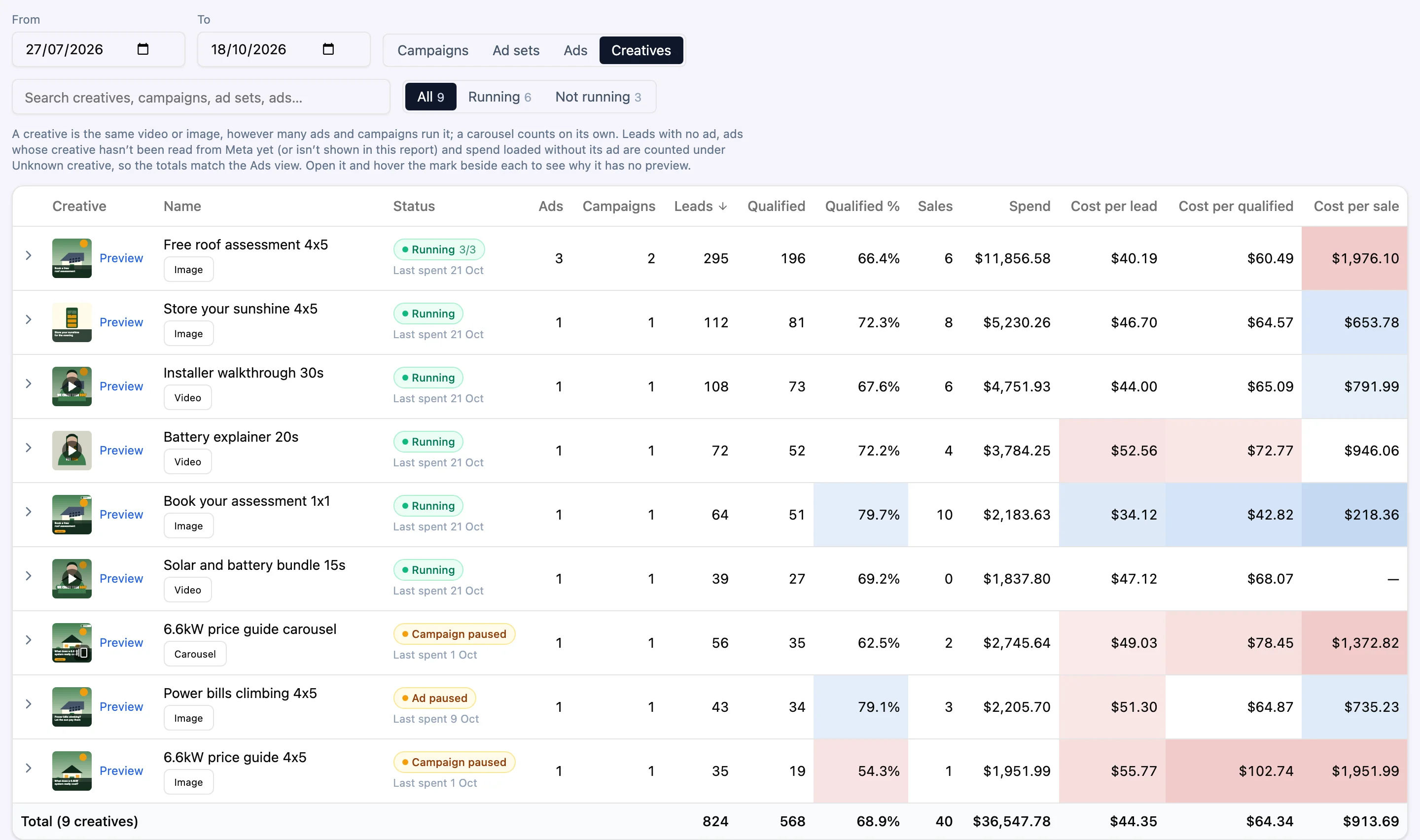
Each image and video from your own Meta account shows with its leads, sales and costs across every ad that runs it, and whether it's running now. Open any ad to preview its creative and copy.

The Creatives view for Saltbush Solar: thumbnails of image, video and carousel ads with their names, running or paused status, ad and campaign counts, leads, sales and costs.
Set-up checklist

A clear path to a working report

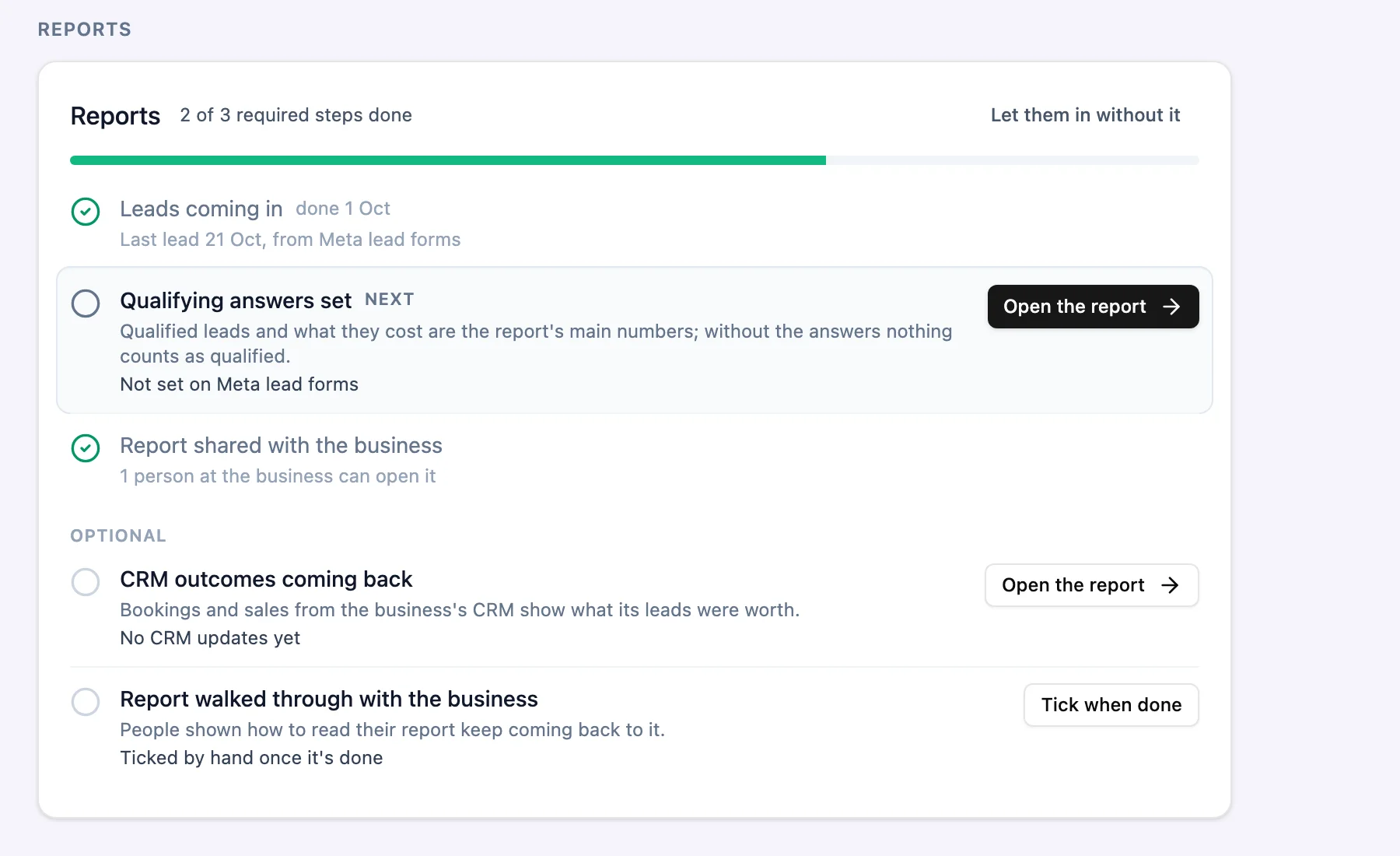
Set-up is a checklist that ticks itself as leads, CRM updates and logins start working, with the next step and a button to do it.

The Reports section of Tallowood Buyers Agents' set-up checklist: two of three required steps ticked, the next step, qualifying answers, picked out with an Open the report button, and two optional steps below.
Report logins and access

The right view for each person

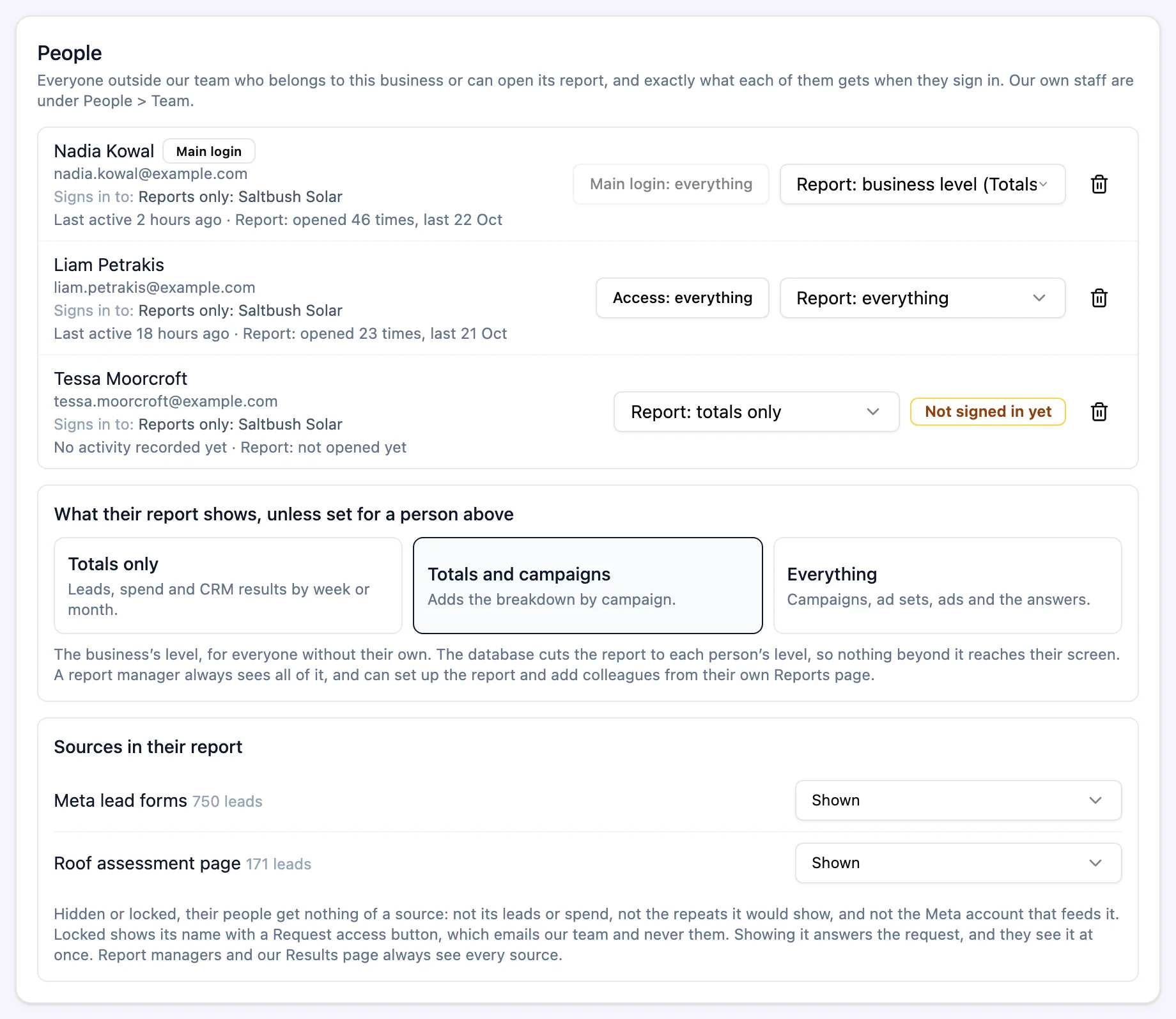
Choose how much of the report each person at your business sees, from totals only to every campaign and ad, and which lead sources are in it.

  • Nobody can be given more access than the person adding them
The People section for Saltbush Solar: three people with what they sign in to and their report level, the business's default level, and the sources shown in their report.
The Trends tab for Saltbush Solar: line charts of leads and qualified leads, site visits and sales, cost per lead and per sale, and spend over twelve weeks.
Trends

Trends over time

The report's figures as line charts over as many weeks or months as you pick.

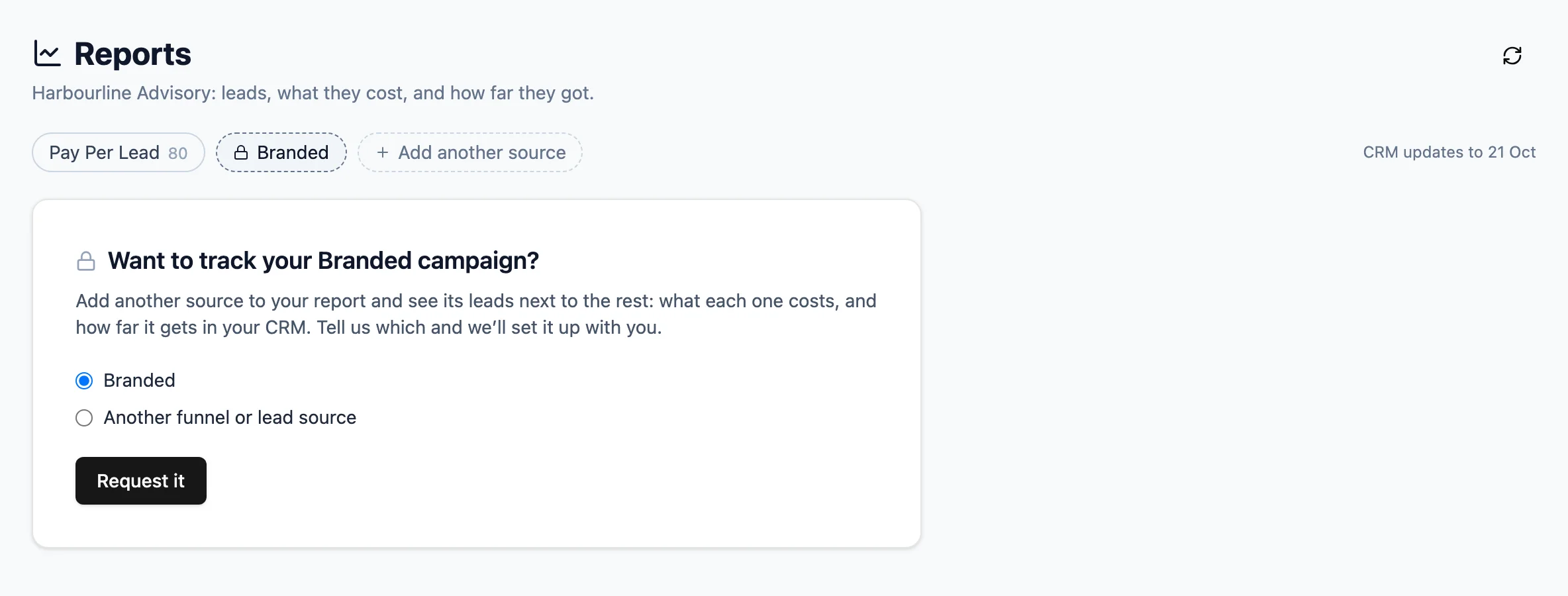
Harbourline Advisory's Reports page as its own login sees it: the Pay Per Lead source, a locked Branded source, and a card asking whether they want to track their Branded campaign, with a Request it button.
More sources

Add a lead source when you need it

A source you don't have on your report yet shows locked, with a button to ask us for it.

What a client says about our reporting

As the Chief Marketing Officer of Trade Certify, I've been managing automations for my whole career. But working with Jackson and his team at Earng Media has been a game-changer for our business. Their expertise in CRM and reporting has been instrumental in our success. They've not only created tailored dashboards but also deliver detailed PDF reports on a weekly and monthly basis. The quarterly analyses and dashboards, which allow for date adjustments, have greatly optimised our sales analysis. The level of detail and customisation they've provided is unmatched, making it easier for us to track progress and make informed decisions. I highly recommend Jackson and his team to anyone looking to elevate their business operations.

RonnieChief Marketing Officer, Trade Certify · Google review, September 2024

Who it's for

For anyone who has to answer “what did we get for that?”

Businesses running Meta ads with a sales team

You know what you spend. Reporting shows what that spend turned into.

Owners who want a number per stage

Cost per lead, per booking and per sale, week by week, without a spreadsheet.

Managers who report upward

Give each person a login with exactly the detail they need.

Your Pay Per Lead buyers

See the leads we supply beside your own sources, in the same report.

Questions

About Reporting.

Do I need to buy leads from you to use Reporting?

No. Reporting works with your own ads and your own leads. If you also buy through Your Pay Per Lead, those leads appear as another source.

Which ad platforms does it read?

Meta, through a read-only connection to your own ad account. It can't change, pause or create ads. Spend from anywhere else can be imported as a file.

How do outcomes get from my CRM into the report?

Your CRM sends updates to a live feed, usually through Zapier or n8n, and we give you the steps. You can also import a file. We map your CRM's stage names onto the report's stages.

Who can see our report?

Only the people you add. Your main login decides what each person can open, and each report viewer sees totals only, totals and campaigns, or everything.

Why can't I see the ad sets behind leads you supply?

For leads we supply through Your Pay Per Lead, the report stops at campaign level, because those ads are ours. Your own ads show in full, down to the creative.

What does it cost?

It depends on what you need. Book a demo and we'll walk you through it on real screens.

See your own numbers in one report.

Book a demo and we'll show you Reporting on real screens, and what it would take to connect your ad account and CRM.